

| Adobe Dreamweaver CS5 | | Learn the Dreamweaver CS5 interface, insert bar, property inspector and asset panels. Define the site plan and connections. Add content to the site with text, hyperlinks, e-mail links, anchors, tables and images. Insert multimedia videos, sound and flash interactive files. | |
| Advanced Photoshop | | Learn advanced techniques using the Adobe Photoshop CS4 interface. | |
| Animate Clay Characters to create movies using Frames | | Create clay animation. Learn story boarding, video techniques, brainstorming, script writing, building sets and props and filming, using Tech 4 Learning's Frames 4. | |
| Beginning Photoshop | | Learn the Adobe Photoshop CS4 interface, basic photo corrections, retouching, layers, masks, channels, typography and vector drawing techniques. Apply and add filters and effects to your digital artwork. | |
| Desktop Publishing | | This hands-on workshop is an introduction to desktop publishing. You will be introduced to the basic concepts of page layout, type, and color, along with the knowledge you will need to turn your newsletter or poster into a professional-looking printed piece. Topics will include file formats, scanning and resolution, importing artwork and images, and basic design concepts. | | (Microsoft Word or Apple Pages) |
| Digital Audio in the Classroom | | Using some simple audio editing tools and music loops, you can create your own podcasts, music and sound effects. Splice music and voice; then add some special effects. Students go from listening to stories to the author of the stories. Learn to share the files as podcasts or simply on a CD or MP3 player. | | (Audacity or Apples Garageband) |
| Digital Device Summit Day 1: Presentations and Panels | | Day one of the Digital Device Summit features a keynote, and hour-long presentations and panels. | |
| Digital Device Summit Days 1, 2, and 3 Full Registration | | Register for all three days and save $10 off the cost of separate registrations. | |
| Digital Device Summit Days 2 & 3: Workshops | | Days two and three of the Digital Device Summit feature two-hour hands-on workshops. Friday July 12 will be a full day of workshops. Saturday July 13 will be a half day of workshops, ending at 12:30. | |
| Digital Photography and Apple iPhoto | | Learn to take great photos with your camera with some creative framing and picture composition. Take your photos into iPhoto and organize them with meta tagging; retouch, crop, fix red eye and levels all with a few clicks of the mouse. Share your photos in web albums, print and even video. | |
| Digital Photography and Picasa | | Learn to take great photos with your camera with some creative framing and picture composition. Take your photos into Picasa, a free image editor by Google, and organize them with meta tagging; retouch, crop, fix red eye and levels all with a few clicks of the mouse. Share your photos in web albums, print and even video. | |
| Digital Storytelling with Alice | Digital storytelling with Alice, a java programming tool designed to teach students computer programming using a 3D environment, http://www.alice.org/. This training is for non-programers, individuals who have wondered about programming but have never had the opportunity to learn it. The focus will be on telling stories for Language Arts, Arts, Social Studies and other non-STEM educators, yes STEM educators can attend. This project is designed to get students exposed to a programming language with the hope of getting them interested in programming as a career, a career skill of the present and future. Educators attending this Alice training will learn the basics of java programming using Alice.
Expectations: After completing this session participants will be expected to take the skills learned back to their classroom/school and work with a team(s) of students to create a simple entry for the ThinkQuest Competition, http://www.thinkquest.org/competition/. | |
| Edit your photos with GIMP | | Learn the GIMP interface, basic photo corrections, retouching, layers, masks, channels, typography and vector drawing techniques. Apply and add filters and effects to your digital artwork. | |
| ePortfolios for Teachers and Students | | Learn to create and interactive electronic portfolio for your individual professional development and for student assessment. Combine multiple file formats and document examples into one cohesive portfolio with an aesthetically pleasing interface. | | (Microsoft PowerPoint, Adobe Acrobat Professional and/or Microsoft Word) |
| Getting Started with Photoshop and Premier from Adobe | | This six hour workshop is focused on getting learners started using Photoshop and Premier. The basics of both programs will be taught so participants will have confidence using these programs to explore multimedia ideas. Educators attending this workshop will also obtain information on how to get free licenses for both program to use with their students as part of the ThinkQuest Competition. Workshop is open to all interested learners. | |
| Google Earth: More than a Pretty Globe | | Google Earth has so many options that can be used in the classroom. New ideas for using this application beyond the normal geography class. Learn how to create virtual tours of a city. Language arts and the globe, find free literature resources that plug-in to Google Earth and learn how to create your own. Earth Science, Astronomy and more are all built into this simple free program. | |
| Google Sketchup for the Classroom | | Google SketchUp is software that you can use to create 3D models of anything you like. Redecorate your classroom. Design a new piece of furniture. Model your city for Google Earth. Create a skatepark for your hometown, there is no limit to what you can create with SketchUp. You can build models from scratch, or you can download what you need from a free 3D warehouse. | |
|
| High Dynamic Range and Panorama Photography | | Create High Dynamic Range (HDR) and Panorama photographs in this hands-on workshop. Capturing multiple image, bracketed photos, blending, tone-map adjustments, and final touch-up in Lightroom and Photoshop will be explored to create unbelievable images. | |
| Hollywood Stars in the Classroom | | Explore digital stories using digital video cameras and editing software. Participants will brainstorm story ideas, develop storyboards, learn video techniques, write scripts, develop shot list, video record, and edit their own stories. | | (Microsoft MovieMaker or Apple iMovie) |
| iPad: Creativity at your fingertips | | With your iPad creativity tools are always within reach. During this six hour workshop learn the basic features to get you started working with your iPad and explore apps that free your creativity. The first half of this workshop will focus on the iPad's interface, syncing, accessibility, apps, and digital content. During the second half of this workshop participants will learn to use the iPad to support their creative urges with capturing photographs, video, photo editing, iMovie, GarageBand, and sharing their creative explorations. | |
| iPad: Publishing your own iBooks | | With your iPad, books and writing tools are always within reach. During this six hour workshop learn the basic features to get you started working with your iPad and explore apps that provide access to books and tools for writing your own stories. The first half of this workshop will focus on the iPad's interface, syncing, accessibility, apps, and digital content. During the second half of this workshop participants will learn to use Apple's Pages to write stories that can then be published as an ePub for the iBooks app on iOS devices. Each participant will create and publish a sample book that demonstrates skills taught during this workshop. | |
| Learning Objects 101 | | Using Microsoft Powerpoint, create interactive learning objects for students independent learning. Learn how to add images, sound and multimedia files for a more interesting presentation. Insert action buttons and export you presentation as a kiosk mode to create the learning module. | |
| MOODLE Workshop for Teachers and Course Developers | | Course development and design for curriculum developers and teachers. This workshop covers instructional design, course administration, membership roles, reports, management, settings, content sharing and much more. | |
| No Mess, no fuss: Creating art on an iPad | | Participants attending this workshop will explore various visual art apps and learn to create and share their own content on the iPad. No need to wear an art smock or worry about stains on your clothes, the paint is guaranteed not to drip when creating on an iPad. | |
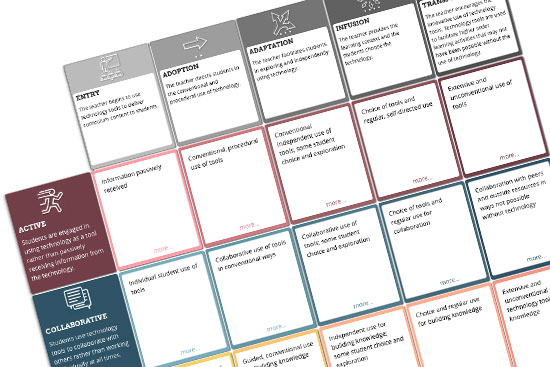
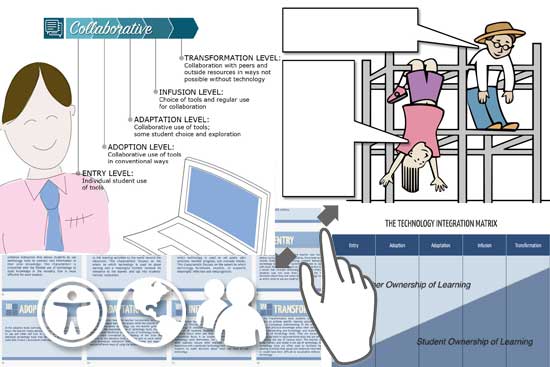
| Polk Institute Support | FDE's Teaching & Learning Institutes bring educators together for four days to focus on technology integration in a workshops environment where they learn, share ideas, explore engaging teaching practices, and create projects using digital tools. Workshop topics include: Technology Integration Matrix; copyright; word processing; searching; spreadsheets; presentations; multimedia including video, audio, and image editing; podcasting; plus electives.
After institute follow-up activities require educators to integrate technology skills learned into their classrooms and schools. | |
| Spreadsheets for the Classroom | | A Spreadsheet gives you and your students the opportunity to develop and strengthen skills as you gather data, create worksheets, analyze and chart the results, and integrate your findings into reports, timelines and assignments. | | (Microsoft Excel or Apple Numbers) |
| Teaching Economics with Digital Tools and Resources | | In this hands-on workshop, teachers will investigate FCIT materials and how they relate to economic and financial literacy concepts. In addition, teachers will use digital storytelling software (i.e. Keynote, PowerPoint, iMovie, Pages) in order to investigate engaging ways to integrate technology into the the classroom. | |
| Telling Digital Stories with Images | | Write, storyboard and plan out a digital story with images. Use a camera or copyright free images from FCIT resources. Insert the images into a presentation application and create an interactive story with music and action buttons. | | (Microsoft PowerPoint or Apple Keynote) |
| Thinkfinity User Training | Training designed to prepare individuals to use Thinkfinity.org to enhance teaching and learning. This session will introduce users to the variety of resources available through Thinkfinity plus share ideas for integrating Verizon Thinkfinity and technology integration into lessons plans.
Expectations: After completing this session participants will be able to identify the variety of resources available through Thinkfinity, understand how Thinkfinity can add depth to previously planned lessons, and engage students through technology integration in all subject areas. | |
| ThinkQuest Train-the-Trainer | FCIT and ThinkQuest will offer a free train-the-trainer session October 8, 2011, Saturday at FCIT/USF from 8:30AM until 5:00 PM. Purpose of the training is to promote the use of the ThinkQuest Project Space, a great tool for Challenge Based Learning, and the ThinkQuest Competition.
Expectations: After completing the training each trainer will be expected to train at least 30 educators in their school, district, or region of the state on the use of ThinkQuest and encourage them to enter the ThinkQuest Competition by enrolling teams of students. | |
| Thinkquest.org | | Learn how to use the FREE ThinkQuest online learning platform that helps students develop important 21st century skills, including communication, critical thinking, and technology skills. ThinkQuest includes a project environment that supports collaborative learning, technology competitions that challenge students to solve real-world problems and the ThinkQuest Library. | |
| Using Promethean Interactive Board in your Classroom | | Learn to use interactive whiteboards to engage your students. This hands-on sessions will cover setting up the interactive whiteboard plus the software provided by the vendor. | |
| Verizon Thinkfinity | | Locate, interpret, and apply FREE lesson plans, resources, literacy activities, art activities, and Project-Based Learning ideas from the content partners within Verizon Thinkfinity. | |
|