Your web browser creates a folder on the hard drive where it saves (or “caches”) certain items that have been downloaded for future access. The browser often downloads images to this folder as you visit different websites. If you visit the same site more than once, the browser will check in this folder first to see if it already has downloaded the images it needs to display the page. If the images are already in the cache, then the web page will display more quickly because the web browser does not have to download the whole page.
Sometimes the cache can get quite large, which can slow down your browser’s performance. One way to speed up your browser in this situation is by emptying your cache. Clearing your cache can also be helpful if you are on a public access computer and want to make sure other people don’t have access to personal information you have entered while visiting a website.
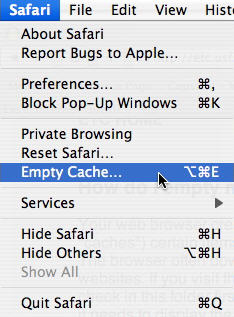
To clear your cache in Safari, choose Safari, Empty Cache from the menu bar.
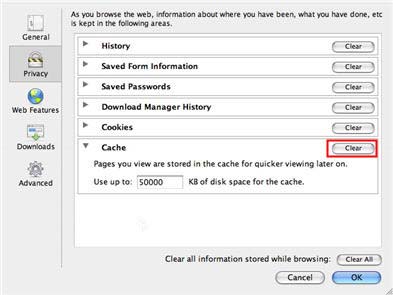
If you are using the Mac version of Firefox, you can empty your cache by choosing Firefox, Preferences, Privacy, then under Cache click on the Clear button.