Tech-Ease
Quick answers to real classroom technology questions. An online service of the Educational Technology Clearinghouse.

ETC HOME
TECH-EASE HOME INTERNET FAQ SEARCH

How can I save a local copy of a website to show to my students in a room with no Internet connection?

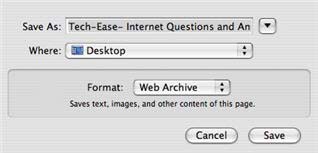
To save a local copy of a website in Safari, select File, Save As and make sure the Format is set to Archive.
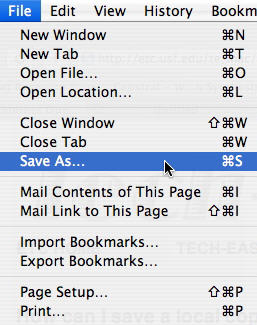
File, Save As

Save As, Name

Safari will then save a local copy of the web page and all the images on it in one file you can move anywhere you want on your hard drive. You can also save this web archive file to a USB drive to copy to other computers.

In Firefox, you can save a copy of a web page to your hard drive by selecting File, Save Page As.
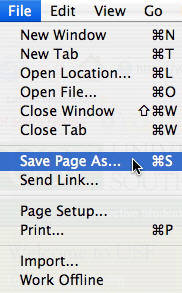
Firefox, File, Save Page As


Additional Websites

ETC HOME
TECH-EASE HOME INTERNET FAQ SEARCH


Site Map | Submit a Question | About Tech-Ease | Privacy Policy | ETC Home

Tech-Ease for Mac is your source for just-in-time answers for classroom technology questions. A companion Tech-Ease for Windows site is also available. This collection is a part of the Educational Technology Clearinghouse. Funding for Tech-Ease content development has been provided by the USF College of Education and various grants from the Florida Department of Education. Copyright 2009 by the Florida Center for Instructional Technology, College of Education, University of South Florida.