As with most computer problems, you should begin with the easiest solutions before moving on to more advanced troubleshooting steps. First, make sure the printer is on and has paper in the tray. You may also want to check that it has ink if you are using an inkjet printer. Next, check to make sure the printer cable is properly connected to both the computer and the printer.
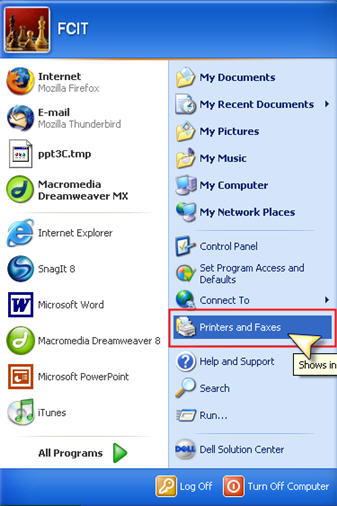
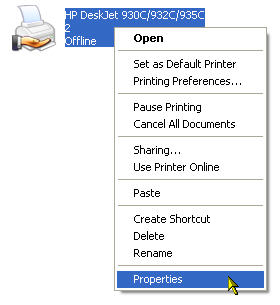
If you still can’t print, check to make sure the printer is not set to offline mode. Go to Start, Printers and Faxes.
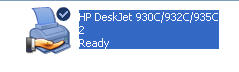
Find the printer you want to use and make sure it says Ready underneath it.
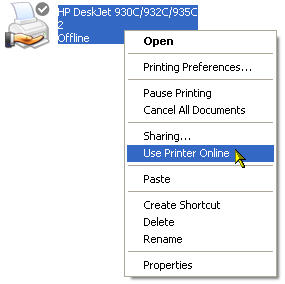
If it says Offline, right-click on it and select Use Printer Online.
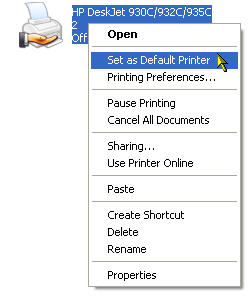
If you have more than one printer installed (such as several network printers) make sure you have selected the right printer as your default printer (right-click on the printer you want to use and select Set as Default Printer).
You can test your printer configuration by printing a test page. Right-click your printer and select Properties. Then in the General tab click on the Print Test Page button.
If you are unable to print a test page after following the previous steps, you may want to restart your computer. Restarting fixes many hardware problems. After restarting, you should try to print a test page again to check your printer configuration. As a last resort, you may want to reinstall the printer driver. You may want to visit the website for your printer’s manufacturer to download the latest software and drivers for your printer.
