Just assigning your students into groups will not result in a collaborative learning experience. One key is to assign specific roles to each student when groups are created. This approach keeps one student from taking over computer time while the other members of the group sit back and watch passively. You can also assign a Techie role to the most technology savvy student in each group. This student will be responsible for either troubleshooting technology problems or communicating them to the teacher if it’s something he or she cannot solve on his or her own.
Beyond simply assigning roles to students, collaboration can be increased by higher levels of technology integration. The Technology Integration Matrix describes what collaboration looks like at five different levels:
- Collaborative Entry. The teacher directs students to work alone on tasks involving technology.
- Collaborative Adoption. The teacher directs students in the conventional use of technology tools for working with others.
- Collaborative Adaptation. The teacher provides opportunities for students to use technology to work with others. The teacher selects and provides technology tools for students to use in collaborative ways, and encourages students to begin exploring the use of these tools.
- Collaborative Infusion. The teacher encourages students to use technology tools collaboratively.
- Collaborative Transformation. The teacher seeks partnerships outside of the setting to allow students to access experts and peers in other locations, and encourages students to extend the use of collaborative technology tools in higher order learning activities that may not have been possible without the use of technology tools.
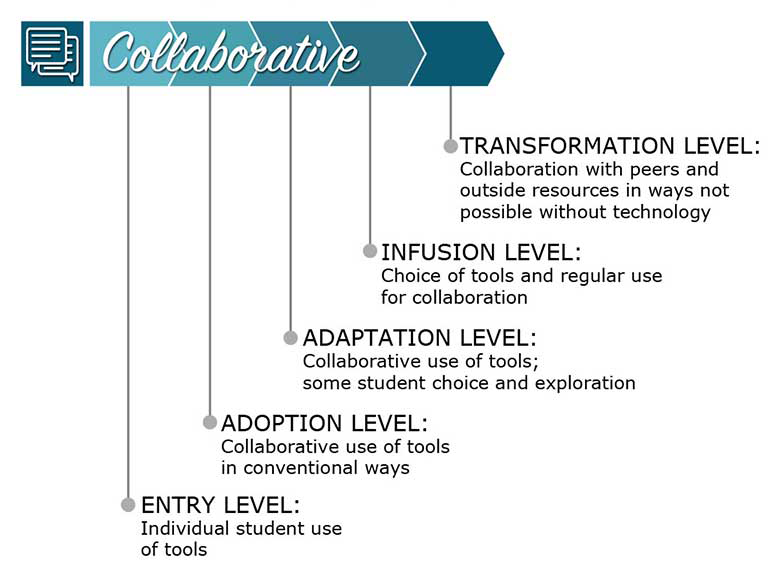
Graphic from the TIM Graphics section of the Technology Integration Matrix website.
