The fact that you only have one computer in your classroom does not mean you cannot successfully integrate technology in your lessons.
If you only have a teacher computer, you will probably want to start using it in your instruction by connecting it to a projector or TV and using it to show PowerPoint presentations, streaming videos, animations, and other content to supplement and add variety to your lessons. It can also be used to bring in content that can target different learning styles. A student who is a visual learner may benefit from watching a video of a speech in a history class, or from watching an animation of frog dissection in biology class. You can also use it to show student work at the conclusion of your technology lessons. Students will be excited to show off their work to their peers, and knowing that they will have to present their work can encourage some students to put in more effort.
Such use of a single presentation station is a typical way of beginning to use technology in the classroom. While there is nothing wrong with such entry-level uses, as you become more familiar with the technology, you should aim to better integrate it into instructional activities. The Technology Integration Matrix is a good roadmap for moving toward a more pedagogically sound use of technology.
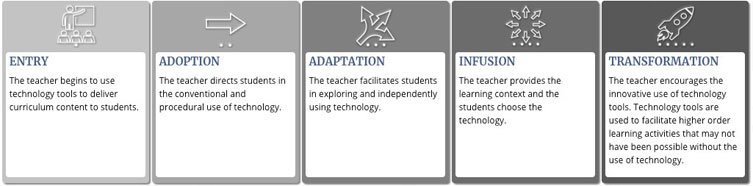
As you can see from the TIM summary table above, there’s nothing about the number of computers required as a teacher moves from an entry level to a higher level of technology integration. Obviously, additional technology in student hands simplifies this, but teacher creativity can overcome obstacles. The important question isn’t “How many devices are in the classroom?” but rather the following:
- Are the students given opportunities to actively use the tech, or do they just sit passively and receive information from the tech?
- Is the tech used to facilitate student collaboration?
- Does the tech help students to connect new information to prior knowledge?
- Are the tech activities linked to the real world or are they artificial “schoolwork” assignments?
- Do students have the opportunity to use the tech to set goals, monitor progress, and evaluate results?
It goes without saying that students in a one-computer classroom will have fewer opportunities throughout the week to engage the technology that students in a 1:1 classroom, but that’s all the more reason to ensure that those opportunities are high quality.
Here are just a few suggestions for moving beyond the use of technology as an entry-level content delivery system:
- Use video-chat software to connect the class to an outside expert to discuss a topic at hand and interact with the class in a Q&A session.
- Use the presentation station to create a concept map of the topic under discussion using a commercial program such as Inspiration or one of the many freeware mapping applications. Although only one student at a time is physically touching the tech, all of the students can contribute their ideas for the arrangement of the information via class discussion. Or use the same process with a student driver who has keyboarding skills to create a wiki regarding the topic at hand. Both concept maps and wikis support collaboration since it is easy to build on and extend the contributions of others.
- Some types of projects (such as movie making) are inherently collaborative activities. Split up your class into groups of 4-5 students and create a rotation schedule for the use of the one computer in your classroom. You can encourage collaboration within these groups by assigning specific roles to each student in the group. Although it’s nice to be able to use tech throughout a movie-making project, planning, scriptwriting, and shooting can all be done off computer. If student groups are encouraged to create simple movies (perhaps demonstrating a science concept) in a single take, then the amount of time each group would need on the shared computer to add titling, credits, and music would be fairly minimal while still allowing the experience and the development of these skills.
- Anytime the shared computer isn’t in use for whole class or group activities, students should be able to access it for their individual projects. The trick is to establish the goal ahead of time rather than allowing students to aimlessly wander about the Internet. Maybe they are to select and download a poem from Lit2Go audiobooks to pair with an image from ClipPix or ClipArt ETC.
