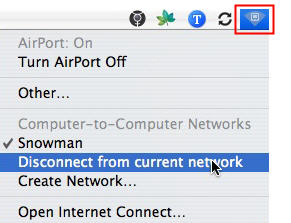
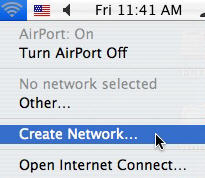
Depending on the school, you may not be able to connect your computer to the network to access the internet, or to use iChat or other collaborative software. Fortunately, if you have more than one laptop in your room, you can use the wireless capabilities of your Mac laptop to create a temporary wireless network. This will allow you to use iChat with your students without giving them access to the internet. To create a new network, click on the wireless signal icon in the menu bar, then choose Create Network from the pulldown menu.
Give your new network a name in the dialog box that opens, then click on OK. You also have the option of creating a password for your network (by clicking on Show Options in the dialog box) but this is not usually necessary. After you connect, the wireless signal icon will change in appearance to show you that you are connected to a computer-to-computer network.

|

|
| Wireless Icon |
Wireless Icon
(Computer-to-Computer Network) |
Once you are finished your activity and no longer need to use the network you created, click on the wireless signal icon and select Disconnect from Current Network.