Tech-Ease
Quick answers to real classroom technology questions. An online service of the Educational Technology Clearinghouse.

ETC HOME
TECH-EASE HOME HARDWARE FAQ SEARCH

How do I share a printer?

If you only have one printer in your classroom that you want to share with several student computers, you can connect that printer to your computer and then share it so that it is accessible from any computer in the room.

To share a printer, you must first add it to your system the same way you add a printer that's directly connected to your computer. Once you have successfully installed the printer, select System Preferences from the Apple menu, then Print & Fax, and click on the Sharing tab.
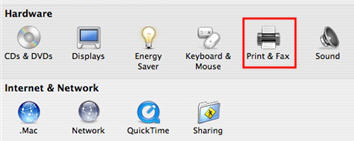
System Preferences, Print & Fax


Check the box next to Share these printers with other computers, and use the checkboxes to select the printer(s) you want to share with other users.
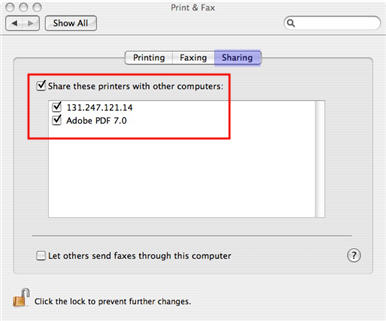
Print, Sharing


Additional Websites

ETC HOME
TECH-EASE HOME HARDWARE FAQ SEARCH


Site Map | Submit a Question | About Tech-Ease | Privacy Policy | ETC Home

Tech-Ease for Mac is your source for just-in-time answers for classroom technology questions. A companion Tech-Ease for Windows site is also available. This collection is a part of the Educational Technology Clearinghouse. Funding for Tech-Ease content development has been provided by the USF College of Education and various grants from the Florida Department of Education. Copyright 2009 by the Florida Center for Instructional Technology, College of Education, University of South Florida.