![]() | Quick answers to real classroom technology questions. An online service of the Educational Technology Clearinghouse. | ||
| ETC HOME |
TECH-EASE HOME |
EMAIL FAQ |
SEARCH |
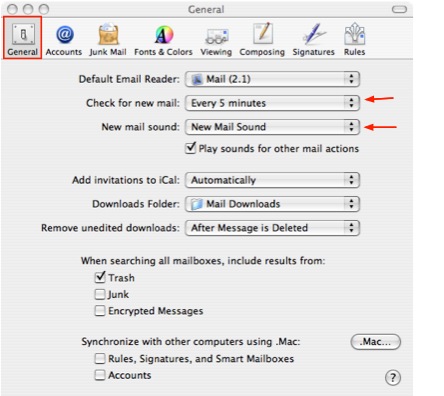
How do I check my mailbox for new messages?Like most email programs, Mail will check your mailbox for new messages
automatically when you open it. Mail can also check your mailbox for
new messages on a set interval. To set how frequently Mail checks your
mailbox, select Mail from the menu bar, then Preferences. In the General
tab, make a selection in the Check for new mail menu. You can set Mail
to check your mail every hour, or every 5, 15, or 30 minutes. You can
also disable the automatic checking of your mailbox by selecting Manually
from the menu. You can set the sound that your computer will play when
it receives new mail in the General tab by selecting it from the New
mail sound menu.
You can still check your email anytime you want by clicking on the Get Mail icon in the toolbar (or by using the keyboard shortcut Command + Shift + N).
|
Additional Websites |
||
| ETC HOME |
TECH-EASE HOME |
EMAIL FAQ |
SEARCH |
Site Map | Submit a Question | About Tech-Ease | Privacy Policy | ETC Home
Tech-Ease for Mac is your source for just-in-time answers for classroom technology questions. A companion Tech-Ease for Windows site is also available. This collection is a part of the Educational Technology Clearinghouse. Funding for Tech-Ease content development has been provided by the USF College of Education and various grants from the Florida Department of Education. Copyright 2009 by the Florida Center for Instructional Technology, College of Education, University of South Florida. |
|||