To send a new message, open Mail and click on the New icon in the toolbar at the top of the program’s window.

A new window should open after you click on the New icon to allow you to address the message and enter the text you want to send in the body of the message.
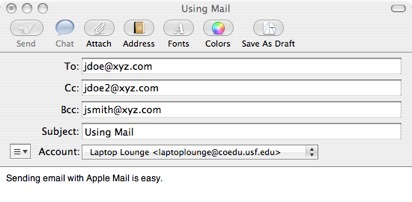
In the To box, type the address of your recipients. Email addresses follow the format recipient name@domain.com. The format for the recipient name will vary according to the naming convention used by the recipient’s email provider but it is usually the first initial followed by the last name. For example, to send an email to someone named Jane Doe at XYZ Corporation we would use an address such as jdoe@xyz.com. You can enter multiple email addresses if you want to send your message to more than one person.
You can use the Cc field to enter the addresses of people who should receive a copy of the message. The Bcc field is used for people who should receive a blind copy. That means that the people listed in the Bcc field will not see the addresses of other recipients.
Once you have addressed your message, enter some text in the subject line to let the other person know what your email is about. It is common courtesy to enter a subject line in all of your emails. Otherwise, the recipient will have to take the extra step of opening the message to see what it is about. With a good subject line, he or she can scan his or her mailbox and quickly determine what a message is about and what action(s) it requires without having to open it. Your recipient will appreciate the time you save them by adding a good subject line in your emails.
The final step before you send your message is to enter some text for the body of the message. You can use the Fonts and the Colors buttons at the top to change the appearance of your text.

You can also make text bold or italic by selecting Format, Style, and then the option you want.
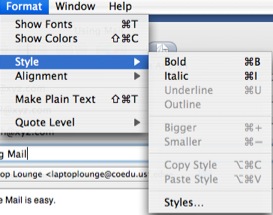
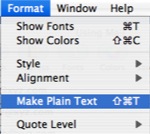
By default, Mail is set to send messages in Rich Text format, which allows you to enhance the look of your message by formatting the text. If you want to send a message as plain text, you can do so by selecting Format, Make Plain Text.
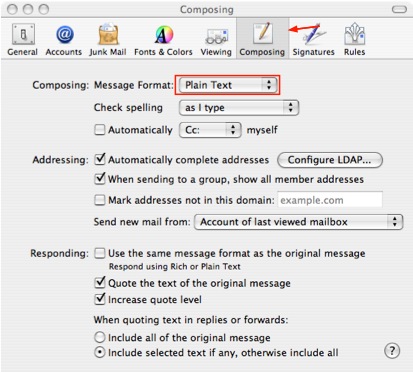
If you want to send all of your messages in Plain Text format, select Mail, Preferences, Composing, and make sure Plain Text is selected in the Message Format pull-down menu.