A signature is text that appears at the bottom of your emails and is often used to include contact information. Some users also use the signature to personalize their emails by including a favorite quote.
To create a new signature in Mail:
- Choose Mail, Preferences and click Signatures.
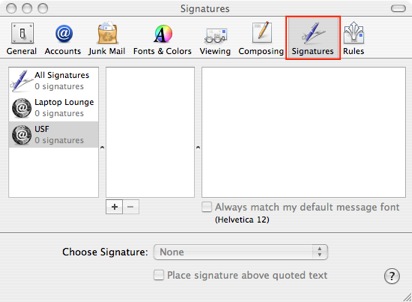
- If you have more than one email account, select the account you want to create a signature for from the list on the left.
- Click the Add (+) button and enter a description for the signature. Mail creates a default signature for you.
- Select any part of the default signature that you don’t want to use and enter your own text.
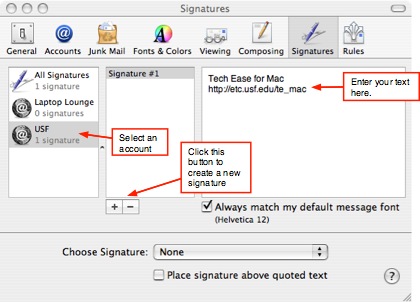
- Select “Always match my default message font” or use the Format menu to change the font, color, style, and alignment of your signature text. When you add formatting, your signature becomes rich text. You can also drag a picture or a vCard file to your signature.
- Use the Choose Signature pop-up menu to choose the default signature for the account. Choose None if you don’t want a signature to appear automatically. To have Mail randomly select a signature, choose In Random Order. To have Mail insert each of your signatures in order, choose In Sequential Order. To change the order, drag the signatures in the list until they are in the order you want.
