You should periodically delete any files or folders you don’t need to conserve space on your hard drive. Deleting a file or folder in OS X is easy. You can just drag the file or folder you want to delete to the Trash icon in the Dock. Another way to delete a file or folder is by holding down the Command key while you press the Delete on your keyboard.
If you change your mind after you have deleted a file or folder, you can still get it back from the Trash. First, open the Trash by double-clicking on its icon in the Dock, then select the files or folders you want to move out of it, and drag them to another location on your hard drive.
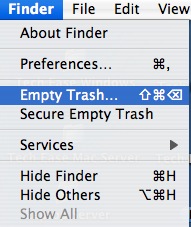
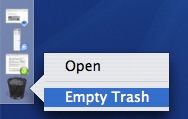
To permanently delete the file or folder, you must empty the Trash by selecting Finder, Empty Trash (or clicking on the Trash icon in the dock until you get a context menu, then selecting Empty Trash).