![]() | Quick answers to real classroom technology questions. An online service of the Educational Technology Clearinghouse. | ||
| ETC HOME |
TECH-EASE HOME |
FILES FAQ |
SEARCH |
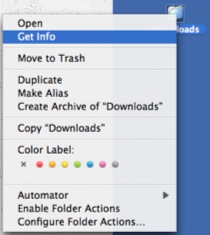
How do I view the properties of a file or folder?To access the properties of a file or folder, control-click on it (or right-click if you have a two-button mouse) and select Get Info.
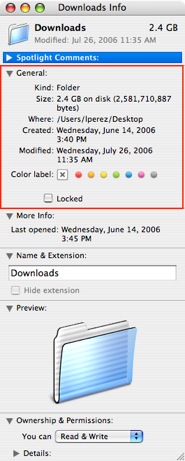
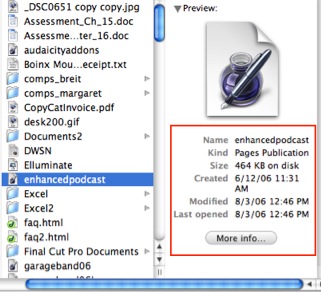
The General section of the Get Info dialog box will provide you with information such as the file's size, the location on the hard drive where it is saved, and the date it was created and last modified. You can also see a lot of the properties for a file or folder by selecting it while you are in Column view in a Finder window. The properties will be listed below the thumbnail preview of the file or folder on the right-most column. You can click on the More Info button to open the Get Info dialog box and view additional properties.
|
Additional Websites |
||
| ETC HOME |
TECH-EASE HOME |
FILES FAQ |
SEARCH |
Site Map | Submit a Question | About Tech-Ease | Privacy Policy | ETC Home
Tech-Ease for Mac is your source for just-in-time answers for classroom technology questions. A companion Tech-Ease for Windows site is also available. This collection is a part of the Educational Technology Clearinghouse. Funding for Tech-Ease content development has been provided by the USF College of Education and various grants from the Florida Department of Education. Copyright 2009 by the Florida Center for Instructional Technology, College of Education, University of South Florida. |
|||