Tech-Ease
Quick answers to real classroom technology questions. An online service of the Educational Technology Clearinghouse.

ETC HOME
TECH-EASE HOME HARDWARE FAQ SEARCH

How do I print in landscape?

Printers can print in portrait or landscape mode. In portrait mode, which is the default, the printer prints pages that are 8.5" wide and 11" tall. In landscape mode, the page is turned on its side. This mode may be useful if you are trying to print a spreadsheet or sign that is wider than it is long.

To switch to landscape mode before printing a document, open the Page Setup dialog box (File, Page Setup), then select the option you want (Portrait or Landscape) by clicking on one of the icons in the Orientation Section.
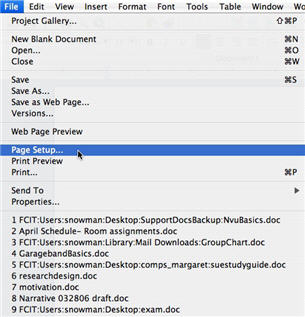
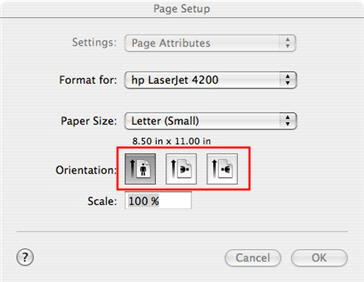
File, Page Setup

Page Setup


Additional Websites

ETC HOME
TECH-EASE HOME HARDWARE FAQ SEARCH


Site Map | Submit a Question | About Tech-Ease | Privacy Policy | ETC Home

Tech-Ease for Mac is your source for just-in-time answers for classroom technology questions. A companion Tech-Ease for Windows site is also available. This collection is a part of the Educational Technology Clearinghouse and is funded in part by a grant from the Florida Department of Education. Copyright 2008 by the Florida Center for Instructional Technology, College of Education, University of South Florida.