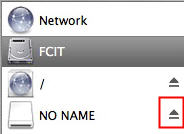
Some USB devices, such as a flash drive or a memory card connected with a USB card reader, must first be ejected before they can be removed from your computer or shut off. The device is ejected to ensure that nothing is being written to the memory card when it’s removed. If you remove the device without first ejecting it the information on it can be corrupted. To eject a device in OS X:
- Select the device you want to remove, such as a flash drive, by clicking on it once.
- Drag the device to the Trash, which will become an Eject icon as you drag.

At that point it is safe to turn off and remove the device from your computer. You can also eject a device by selecting it on the desktop and using the keyboard shortcut Command + E, or you can open up a Finder window and then click on the eject icon next to the device’s name.