Most email programs will check your mailbox for new messages automatically when you open them. If your program does not, you may want to check your preferences (Tools, Options in both Outlook Express and Thunderbird).
Checking your email is as simple as clicking on the appropriate icon in the toolbar. In Outlook 2003 and Outlook Express, click on the Send/Receive icon, while in Thunderbird the icon is labeled Get Mail.

You can also use a keyboard shortcut to quickly check your mailbox for new messages. In Outlook 2003 and Outlook Express this keyboard shortcut is Control + M. In Thunderbird, the shortcut is Control + Shift + T. After you check your mailbox, a number will appear in parenthesis next to the mailbox to let you know how many new messages you have.
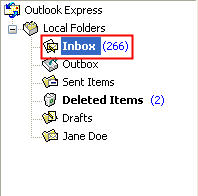
You can then open the mailbox to see the new messages, which will be displayed in bold.
