![]() | Quick answers to real classroom technology questions. An online service of the Educational Technology Clearinghouse. | ||
| ETC HOME |
TECH-EASE HOME |
FILES FAQ |
SEARCH |
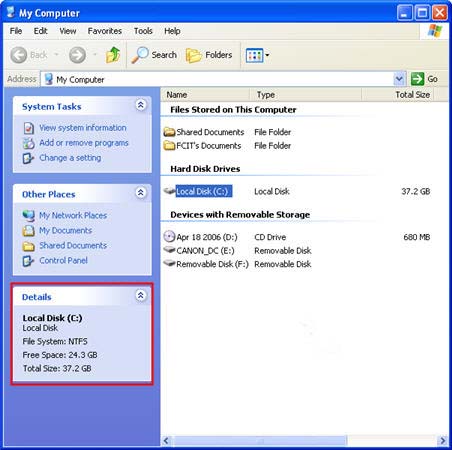
How do I find out how much space I have free to store files on my computer?An easy way to find out how much space is free on your hard drive (usually labeled the C: drive) is by opening My Computer, selecting the drive, and then looking at the Details section on the bottom left of the window. The details section will show you the total size of your hard drive, and how much free space you still have available to store files.
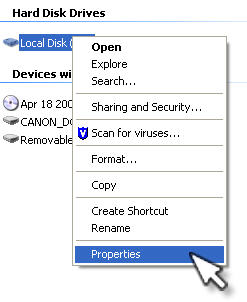
If you want to see a visual representation of this information, right-click on the drive in My Computer and select Properties.
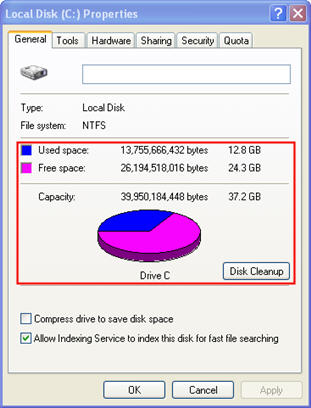
The General tab will display a pie chart where you can see how much of your hard drive is still available (as represented by the magenta color on the pie chart).
|
Additional Websites
|
||
| ETC HOME |
TECH-EASE HOME |
FILES FAQ |
SEARCH |
Site Map | Submit a Question | About Tech-Ease | Privacy Policy | ETC Home
Tech-Ease for Windows is your source for just-in-time answers for classroom technology questions. A companion Tech-Ease for Mac site is also available. This collection is a part of the Educational Technology Clearinghouse and is funded in part by a grant from the Florida Department of Education. Copyright 2008 by the Florida Center for Instructional Technology, College of Education, University of South Florida. |
|||