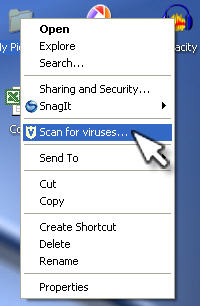
In order to protect your computer from being infected by a virus or other malicious program, you should have an anti-virus program installed. The computer at your school will probably already have this kind of program installed, but you need to keep it updated with the latest definition files for it to be effective. The latest definition files update your anti-virus program so that it can recognize new viruses.
If you transfer files between your home and work computer, you should make sure that you have an anti-virus program installed on your home computer as well. If you do not want to spend extra money, there are several free programs that do a good job of protecting your computer against viruses, such as AVG Antivirus and AntiVir. Both programs allow you to download updated definition files for free as well.
Even if you have an anti-virus program installed, you should still take some precautions to keep your computer safe. The most basic precaution you can take is to not open email attachments or downloaded files without first scanning them with your anti-virus program. You should first save the attachment or downloaded file to a folder on your hard drive and then scan that folder with your anti-virus program. This is often done by right-clicking on the folder and selecting the appropriate option from the context menu.