Most network connection problems can be solved by following some simple troubleshooting steps:
- Begin with the easiest solution. With networking, this is checking to make sure the network cable is properly connected to both the computer and the network port on the wall. If you do not see a blinking light on your network card, chances are the physical connection to the network may be the problem. Double check those cables.
- If you are in a room that has more than one network port, try connecting using a different port. If that works, then the network port may be the problem. You should let your tech specialist or network administrator know that there is a bad port in your room.
- If you are on a wireless network, moving your computer may cause you to fall out of the range of the wireless access point. Try moving your computer to a different location to see if you regain connectivity.
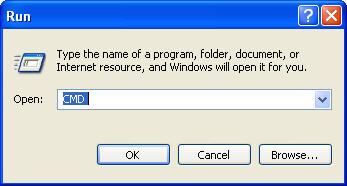
- Sometimes your computer may need to have its IP address renewed. Each computer on the network needs to have a unique address, known as the IP address. To renew the IP address, go to Start, Run and type CMD to open up a shell.
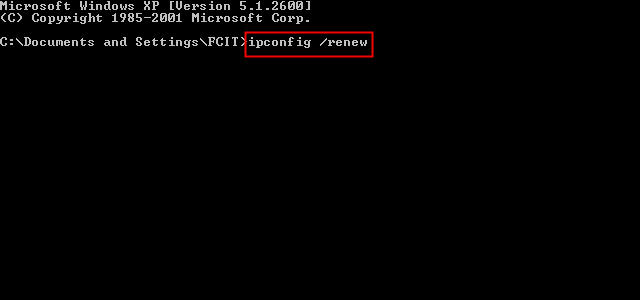
Next, type in ipconfig /renew (make sure to have a space between the two words) to get a new IP address for your computer.
If you still cannot connect after trying these troubleshooting steps, your network card may be improperly installed, or it may not be properly configured to work with your network. You will need to contact your tech specialist for assistance.
