![]() | Quick answers to real classroom technology questions. An online service of the Educational Technology Clearinghouse. | ||
| ETC HOME |
TECH-EASE HOME |
CHAT FAQ |
SEARCH |
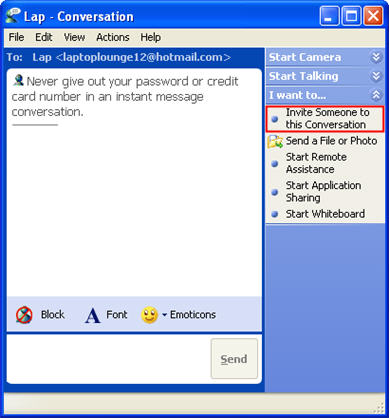
How do I chat with more than one buddy at a time with Windows Messenger?With Windows Messenger, you cannot initiate a chat with more than one person, but you can add people to a conversation once you have started it. A total of five people can take part in a group conversation, including you. To add contacts to a conversation, open a conversation with one of your contacts and then click Invite Someone to this Conversation.
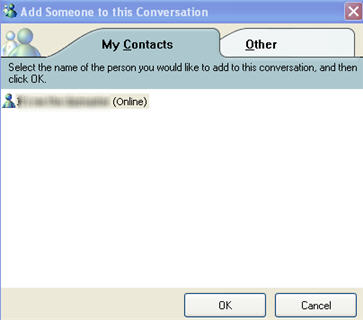
Click on the name of the contact you want to add and then OK.
|
Additional Websites |
||
| ETC HOME |
TECH-EASE HOME |
CHAT FAQ |
SEARCH |
Site Map | Submit a Question | About Tech-Ease | Privacy Policy | ETC Home
Tech-Ease for Windows is your source for just-in-time answers for classroom technology questions. A companion Tech-Ease for Mac site is also available. This collection is a part of the Educational Technology Clearinghouse and is funded in part by a grant from the Florida Department of Education. Copyright 2008 by the Florida Center for Instructional Technology, College of Education, University of South Florida. |
|||