Tech-Ease
Quick answers to real classroom technology questions. An online service of the Educational Technology Clearinghouse.

ETC HOME
TECH-EASE HOME CHAT FAQ SEARCH

How do I change my online status with Windows Messenger?

You can change your status from Online to Away if you need to step away from your computer for a short period of time.  This way your online contacts know not to send you any chat invitations while you are away. 

To change your online status, select File, Status, and select one of the options (Busy, Be Right Back, Away, On The Phone, or Out to Lunch).
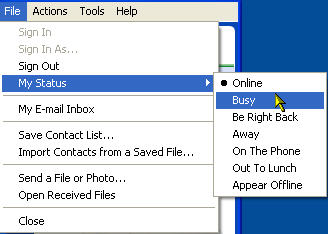
Status

You can also choose to make yourself invisible to your online contacts by selecting the Appear Offline option.  
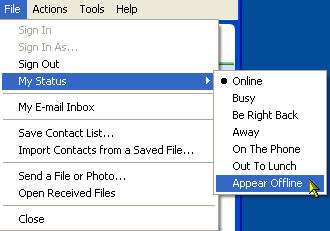
Status, Offline

You can access the same options by clicking on the downward arrow next to your name at the top of the contact list. 
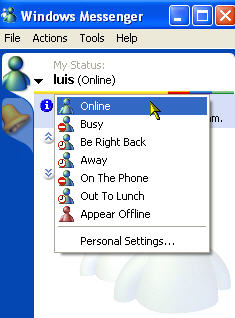
Status, Online


Additional Websites

ETC HOME
TECH-EASE HOME CHAT FAQ SEARCH


Site Map | Submit a Question | About Tech-Ease | Privacy Policy | ETC Home

Tech-Ease for Windows is your source for just-in-time answers for classroom technology questions. A companion Tech-Ease for Mac site is also available. This collection is a part of the Educational Technology Clearinghouse and is funded in part by a grant from the Florida Department of Education.  Copyright 2008 by the Florida Center for Instructional Technology, College of Education, University of South Florida.