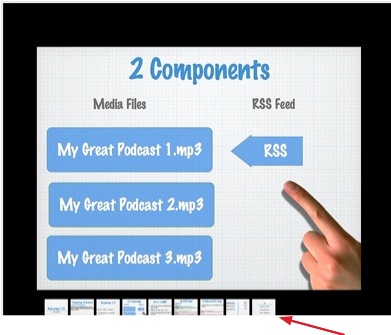
Flickr is an online photo hosting program that can also be used to host presentations online if you export your Powerpoint slides as images.
To save your slides as images in Powerpoint:
- Select File > Save As.
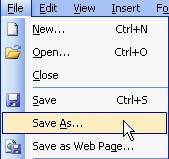
- Select JPEG or GIF from the Format pulldown menu.
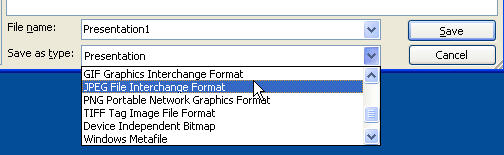
- Click on Save to save your slides to a folder on your computer. Each slide will be an individual image file.
Once you have your slides as images, you have to upload these images to Flickr. The easiest way to do this is by using the batch uploader for Windows XP .
To upload images with the uploader:
- Launch the program and click on the Add (+) button to select the images you want to upload (in this case the slides you exported as images). You can also drag and drop your images from any Explorer window to add them to the Uploadr. The images for the slides will appear as thumbnails in the Uploadr window. Click on the Upload button when you have added all the images you want to upload together.

- On the next screen, enter the tags you want to use for the group of images you are uploading.
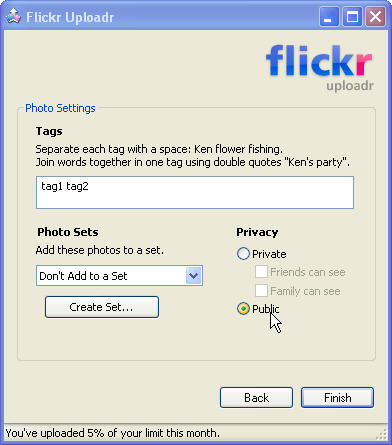
- Click on Finish. On the next screen, click on Done to upload more images, or on See Photos to open the images on Flickr using your default web browser.

After you upload the images to Flickr, the next step is to organize them into a set that can be played as a slideshow:
- Click on Organize at the top of the Flickr window.

- This will bring up the Organizr. Drag the slides you want to add to the set to from the Findr (the area at the bottom of the window) to the canvas.
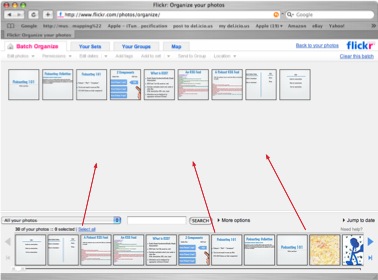
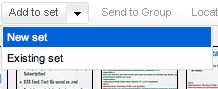
- Select Add to Set > New Set from the pulldown menus at the top of the window.
- Enter a name for your set and rearrange your images into the order you want them to appear when the slideshow plays (drag and drop the images to change the order of the slides).
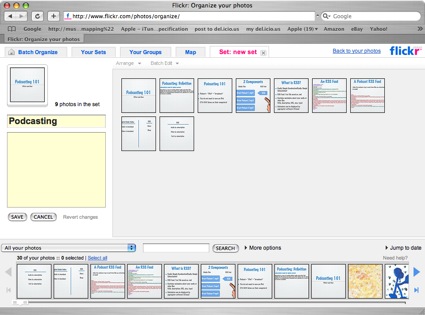
- Click on Save.
Once your presentation is set up as a set, anyone can go to your Flickr page (https://www.flickr.com/photos/yourusername) and click on the set on the right to open it. They can then click on the View as slideshow link at the top of the window to start the slideshow.
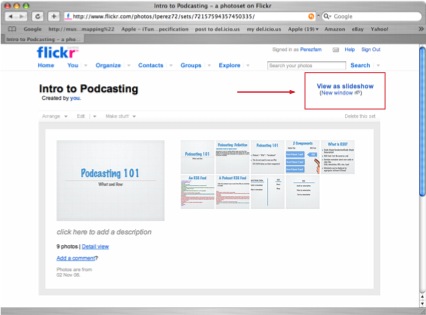
The slideshow controls will appear when the person viewing the slideshow hovers over the top portion of the slideshow area.

A navigation bar showing all the slides in the presentation will be displayed if they hover over the bottom part of the slideshow area. The person viewing the slideshow can skip around to different slides by clicking on them.