Pop-up windows are often used to display advertisements that appear when you visit a web page. One way to stop these pop-up windows is by using a web browser that has a built-in pop-up blocker. Most of the major web browsers, such as Internet Explorer, Netscape, and Mozilla Firefox, now feature a pop-up blocker.
If you have the latest version of IE installed (the one included with Windows XP Service Pack 2), it will display an information bar to let you know that a pop-up has been blocked whenever you visit a site that generates pop-up windows.
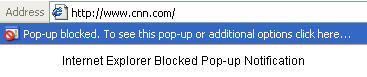
There may be sites for which you want to allow pop-up windows. One example is this page from the FCIT Making the Connection website. When you click to see one of the Teacher Notes on this site it is displayed in a small pop-up window. To allow pop-up windows for a specific website you have to change the settings for your pop-up blocker.
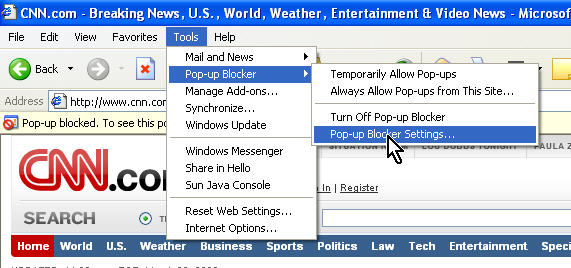
In IE, you can access the settings for the pop-up blocker as follows:
- Choose Tools, Pop-up Blocker, Pop-Up Blocker Settings (or Tools, Internet Options, Privacy and click on the Settings button at the bottom of the window, next to the checkbox that enables the blocker).
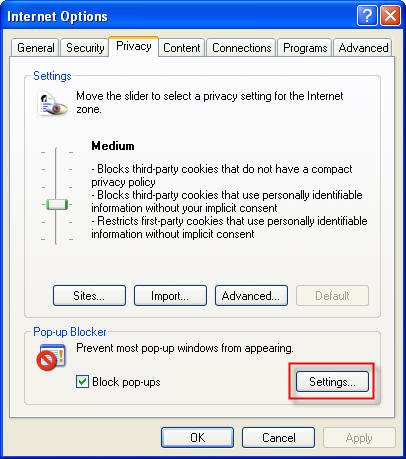
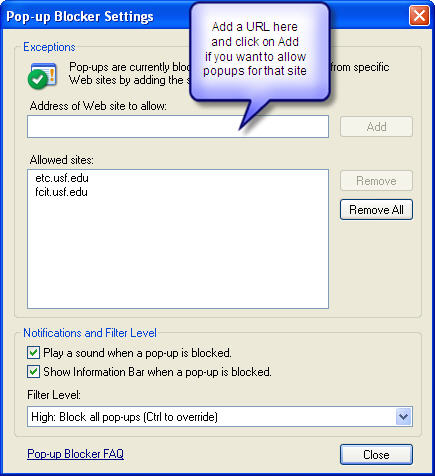
- In the settings area for the pop-up blocker, you can add sites for which you want to allow pop-ups and change the type of notification you receive when a pop-up is blocked (you can set it to play a sound every time a pop-up is blocked).
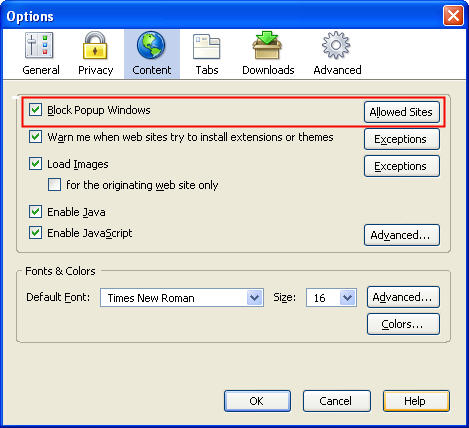
 In Mozilla Firefox, you can access the settings for the built-in pop-up blocker by choosing Tools, Options, Web Features (or Tools, Options, Content). You can click on the Allowed Sites button next to the to Block Pop-up Windows checkbox to add websites for which you want to enable pop-up windows.
  Pop-up windows can also be created by malicious programs known as spyware or adware. If you are getting pop-ups even when your web browser is closed, you may have one of these programs running in the background. To remove spyware or adware, you can install a program such Ad-aware or Spybot Search and Destroy that will scan your hard drive and remove any instances of spyware or adware.
