There are a few precautions you can take to ensure that your computer does not fall victim to viruses, spyware, and other security threats while you surf the Web:
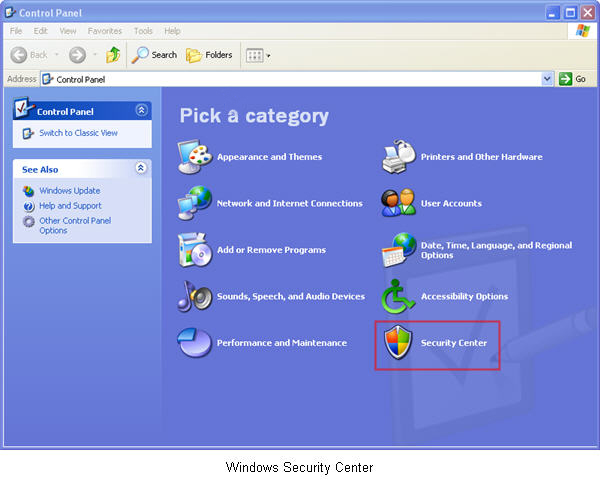
- Use a Firewall – A firewall is a piece of software that monitors communication between your computer and the internet, and only allows certain types of things to cross the wall. Windows XP with Service Pack 2 includes a basic firewall, or you can download a free application such as Zone Alarm. To turn on the Windows firewall, look for the Security Center applet in the Control Panel (Start, Settings, Control Panel).
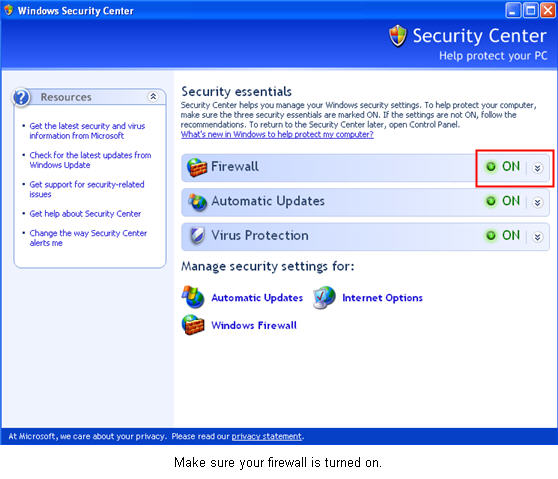
- Virus Scan – It is possible to download a virus to your computer just by visiting a website. A virus scanner will locate and remove infected files from your hard drive so that they cannot do any damage or spread to other users such as your students and colleagues. Even if you cannot purchase a commercial virus scanner such as Norton AntiVirus, you can still protect your computer by installing a free program such as AntiVir or AVG Antivirus. Because new viruses are arriving every day, it’s important to keep your virus definitions up-to-date. Be sure to enable the scanning software’s automatic-update feature and have it do so at least every week, if not every day.
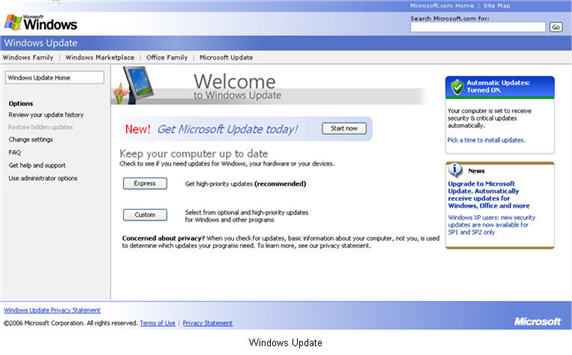
- Stay Up-To-Date – Most viruses exploit an already existing security vulnerability or exploit in your web browser. Most of the time there is already a patch to fix this vulnerability, but a virus may continue to spread by using unpatched systems. To make sure you have the latest updates installed on your computer, visit the Windows Update website on a regular basis and download the critical and security updates.
- Be careful with downloads – If at all possible, you should avoid downloading files from unknown sources on the internet as a rule, especially anything that can be executed on your system (files ending with the .exe extension). However, if you absolutely need to download a file you should at least take some precautions to make sure it will not harm your computer. The most basic precaution is to create a folder where you save downloaded files and scan them with your virus scanner prior to opening them.
