Tech-Ease
Quick answers to real classroom technology questions. An online service of the Educational Technology Clearinghouse.

ETC HOME
TECH-EASE HOME EMAIL FAQ SEARCH

How do I add a link to a webpage in my message?

You can easily add a link to a webpage to any message in Mail. To add your hyperlink, select some text in the body of the message you are composing, then select Edit, Add Hyperlink.
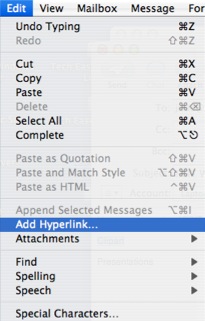
Edit, Add Hyperlink

Enter the URL of the webpage you want to link to, then click on OK and your hyperlink will be created.
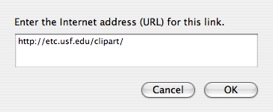
Add Hyperlink Window

Mail works with Safari to enable you to easily mail links to pages you are viewing in your web browser. To email a webpage in Safari, select File, Mail Contents of This Page or Mail Link to This Page.
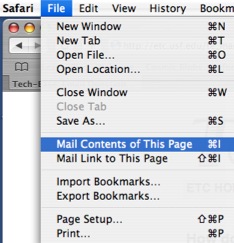
File, Mail Contents of this Page

Either option will automatically open Mail so that you can address the message that will include the link. The difference between the two options is that the second one will only include a hyperlink, while the first will include the webpage itself in the body of the message.


Additional Websites

ETC HOME
TECH-EASE HOME EMAIL FAQ SEARCH


Site Map | Submit a Question | About Tech-Ease | Privacy Policy | ETC Home

Tech-Ease for Mac is your source for just-in-time answers for classroom technology questions. A companion Tech-Ease for Windows site is also available. This collection is a part of the Educational Technology Clearinghouse. Funding for Tech-Ease content development has been provided by the USF College of Education and various grants from the Florida Department of Education. Copyright 2009 by the Florida Center for Instructional Technology, College of Education, University of South Florida.