Tech-Ease
Quick answers to real classroom technology questions. An online service of the Educational Technology Clearinghouse.

ETC HOME
TECH-EASE HOME HARDWARE FAQ SEARCH

How do I change the default printer?

If you know you are always going to be using the same printer (and you have more than one printer installed on your computer, such as a local printer and one or more network printers), you can make that printer the default printer that will be used each time you print from your Mac programs.

To change your default printer:

  1. Choose System Preferences from the Apple menu, then Print & Fax.
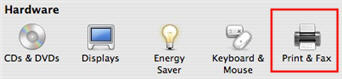
    System Preferences, Print & Fax

  2. Click on the Printing tab to see all the printers installed on your computer. The current default printer will be in bold.
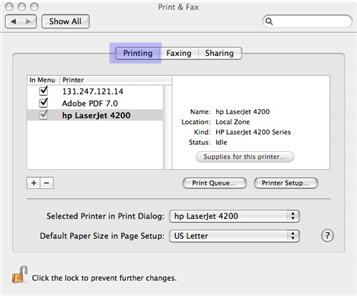
    Printing tab

  3. If you want to change the default printer, select a different printer from the Selected Printer in Print Dialog pull-down menu.
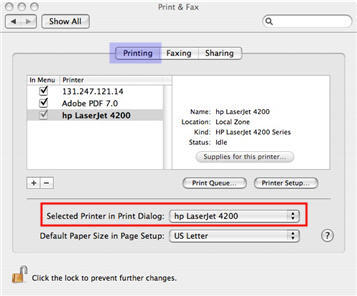
    Selected Printer in Print Dialog

The printer you select in Step 3 above will now be selected as the default each time you select File, Print in an application.


Additional Websites

ETC HOME
TECH-EASE HOME HARDWARE FAQ SEARCH


Site Map | Submit a Question | About Tech-Ease | Privacy Policy | ETC Home

Tech-Ease for Mac is your source for just-in-time answers for classroom technology questions. A companion Tech-Ease for Windows site is also available. This collection is a part of the Educational Technology Clearinghouse and is funded in part by a grant from the Florida Department of Education. Copyright 2008 by the Florida Center for Instructional Technology, College of Education, University of South Florida.