NOTE: As of March 16, 2016, Google ceased to support Picasa and encouraged users to migrate to Google Photos. The Picasa application will continue to function, however, and can still be used by those who prefer it. We are maintaining the Picasa posts within TechEase because we find that many people are still using the application and come to the TechEase site looking for the specific help we offer.
You can use Picasa’s crop feature to remove unwanted parts of any photo. Cropping can also be used to improve the composition of a photo.
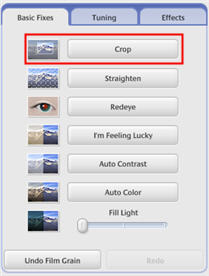
To crop a photo, first open it in the editing window by double-clicking on it in the Lightbox, then select the Basic Fixes tab and click on the Crop button.
You can then select from preset dimensions, or you can click on Manual.
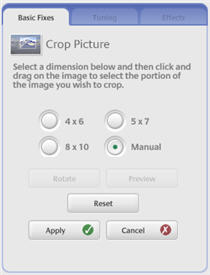
If you select Manual, you can drag and drop in your image to create a bounding box. The parts of your image that will be cropped will be grayed out.

Once you have drawn your bounding box, you can click on Preview to see a preview of the cropped image. If you are happy with the result, click on Apply to perform the crop.
